

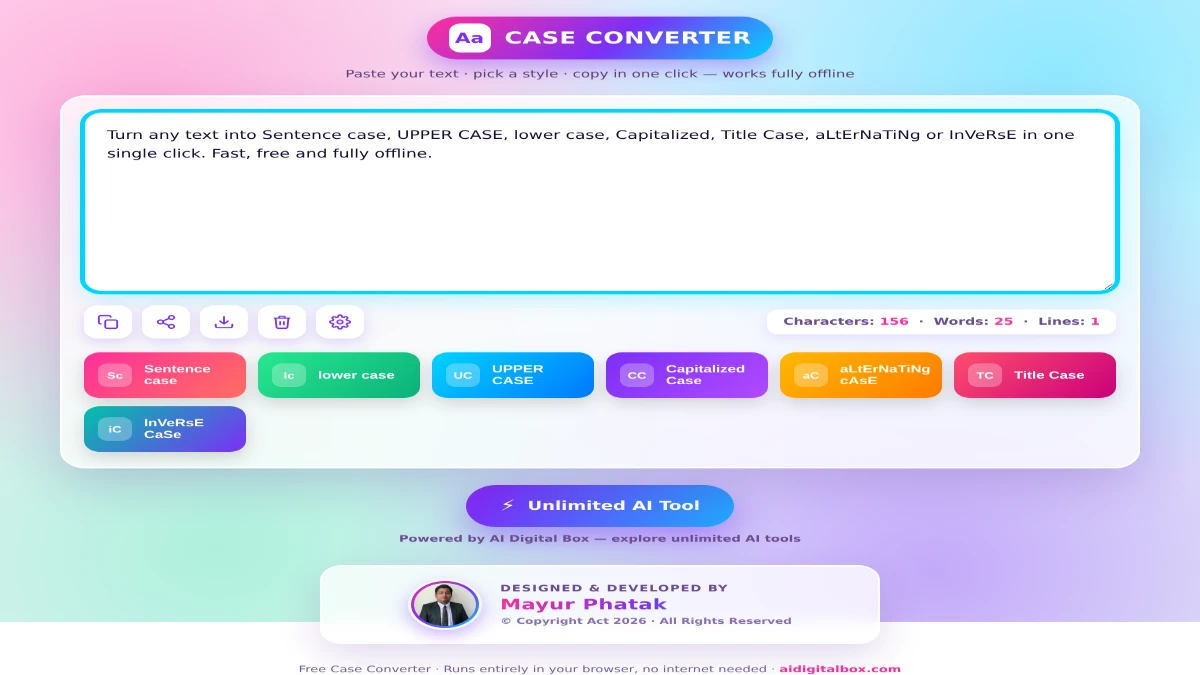
Have you ever pasted a heading in ALL CAPS and then had to retype every single word just to fix it? Or copied text that came out in random capitalization that simply would not look right in your document? If so, this free case converter tool is about to save you a lot of time. In just one click, it transforms your text into any case you need — no typing, no installation, and no internet connection required.
In this post, I’ll walk you through what the tool does, why it’s useful, and how you can start using it in seconds.
What Is a Case Converter Tool?
A case converter tool is a simple online utility that changes the capitalization of your text. Instead of manually editing letters one by one, you paste your content, click a button, and the tool instantly rewrites it in the format you choose.
This is incredibly handy for writers, students, bloggers, social media managers, developers, and anyone who works with text every day. Whether you’re fixing a messy paragraph, formatting a blog title, or cleaning up data, the right case format makes your content look professional and polished.
7 Text Formats You Can Convert To
This free online text case converter supports seven different formats, so you’re covered no matter what you need:
- Sentence case – Capitalizes the first letter of every sentence. Perfect for paragraphs and body text.
- lower case – Converts all letters to lowercase. Great for casual styling or normalizing data.
- UPPER CASE – Turns everything into capital letters. Ideal for headings, warnings, or emphasis.
- Capitalized Case – Capitalizes the first letter of every word.
- aLtErNaTiNg cAsE – Alternates between lowercase and uppercase letters for a fun, stylized effect.
- Title Case – Capitalizes major words while keeping small words (a, an, the, of, to) lowercase — exactly how professional titles should look.
- InVeRsE CaSe – Flips the case of every letter, turning uppercase to lowercase and vice versa.
Key Features That Make This Tool Stand Out
This isn’t just another basic converter. Here’s what makes it genuinely useful:
- Works 100% offline. Once the page loads, you don’t need an internet connection. Your text never leaves your device, which makes it perfect for sensitive or private content.
- Lightning fast. Conversions happen instantly — no waiting, no page reloads.
- Live word, character, and line count. Keep track of your content length in real time, which is great for meta descriptions, tweets, and word-limited assignments.
- One-click copy, share, and download. Once converted, copy your text to the clipboard, share it, or download it as a .txt file.
- Clean, bright, easy-to-use interface. No clutter, no confusing menus — just paste and click.
- Completely free. No sign-up, no subscription, no hidden charges.
How to Use the Case Converter Tool
Using the tool takes just a few seconds:
- Paste your text into the input box.
- Choose your format by clicking one of the case buttons (Sentence case, UPPER CASE, Title Case, and so on).
- Copy, download, or share your converted text using the toolbar icons.
That’s it. There’s nothing to learn and nothing to install.
Who Should Use This Tool?
- Content writers and bloggers formatting headlines and articles.
- Students fixing assignments and essays quickly.
- Social media managers styling posts and captions.
- Developers and data analysts normalizing text and variable names.
- Office professionals cleaning up emails, reports, and presentations.
If you work with words in any capacity, this tool earns a permanent spot in your bookmarks.
Frequently Asked Questions
Is this case converter tool free? Yes, it’s completely free to use with no sign-up or subscription required.
Does it work without the internet? Yes. After the page loads once, the tool runs entirely in your browser and works fully offline.
Is my text safe? Absolutely. Your content is processed locally on your own device and is never uploaded or stored anywhere.
Can I use it on my phone? Yes, the tool is mobile-friendly and works on phones, tablets, and computers.
Try It Now
Stop wasting time retyping text just to fix capitalization. This free case converter tool does the work for you in a single click — fast, private, and completely free.
Want access to even more handy tools? Explore the full collection of free and powerful utilities at Free Text Case Converter Tool, your one-stop destination for unlimited AI tools.