
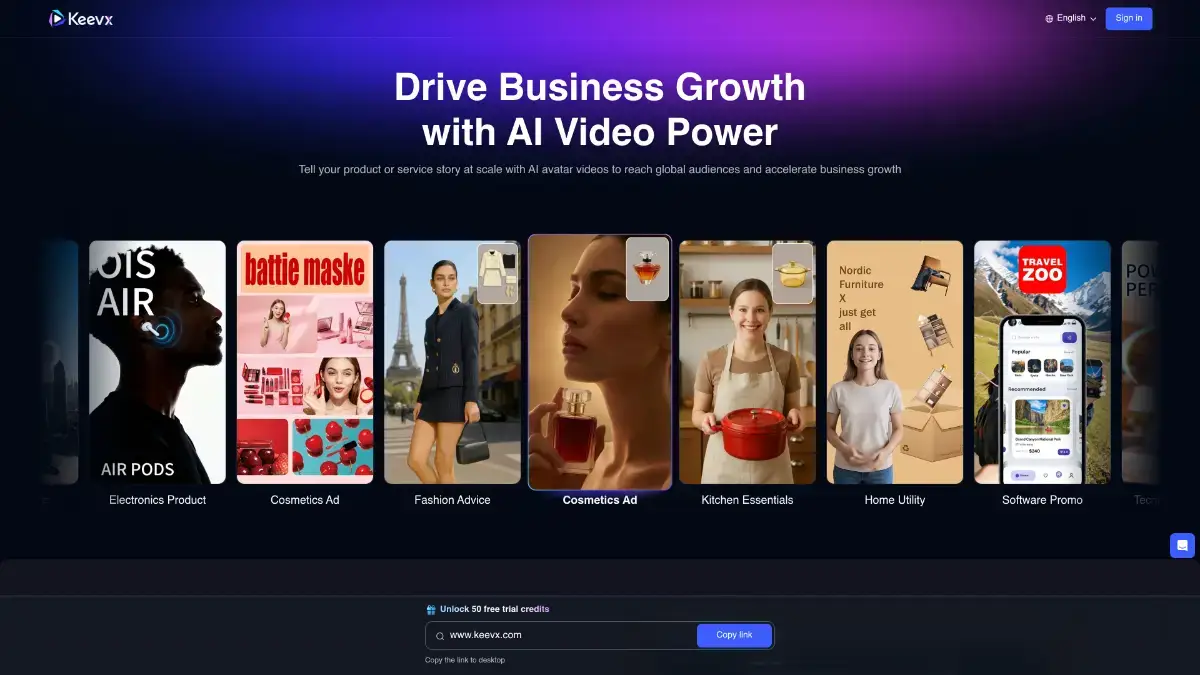
Roughly 82% of global internet traffic now moves through video, according to Cisco’s most recent forecasts — and most small e-commerce sellers still can’t afford to film a single product ad. That gap is exactly why tools like Keevx exist. In this Keevx review 2026, I’ll share what happened when I ran the platform for a full month on real ad campaigns, what it actually does well, where it falls short, and whether you should pick it over HeyGen or Synthesia.
No fluff. Just the stuff you’d want a friend to tell you before you hand over your card. Let’s get into it.
What Is Keevx?
Keevx is a web-based AI video platform built mostly for advertisers and e-commerce sellers. You paste a product URL, upload a script, or drop in an idea, and it spits out a finished avatar-led video in a few minutes. It also translates and dubs existing videos into 170+ languages with automatic lip-sync Keevx, which is the part that matters most for cross-border brands.
The platform was launched in mid-2025 by Keevx Private Limited and has grown fast in the AI ads space. Its core pitch is simple: turn any Amazon, Shopify, eBay, or Etsy listing into a video ad without a camera, mic, or editor. So if you’re running a D2C store and testing creatives every week, that’s the pitch you’re buying into.
What makes Keevx feel different from HeyGen or Synthesia? The URL-to-video feature. The others assume you already have a script. Keevx assumes you have a product page and wants to do the rest for you.
Key Features of Keevx
Here’s what you actually get when you log in. I’ll stick to the features I personally used.
Turn Links Into Videos (URL to Video)
Paste a product URL and Keevx scrapes the title, images, price, and selling points. It then auto-writes a short ad script, picks an avatar, adds voiceover, and builds the video. I tested it on three Shopify pages and one Amazon listing. Output time averaged around 4 minutes per video on the Pro plan.
For advertisers running daily A/B tests on Meta or TikTok, this alone is the reason to sign up.
AI Video Translation and Dubbing
Upload an existing ad, pick a target language, and Keevx redubs it with a synced mouth. I ran an English ad through Spanish, Hindi, and German. The Spanish lip-sync was honestly the best; Hindi was decent but slightly stiff on plosives. Not perfect, but nowhere close to obvious dubbing.
Avatar Library and Voice Cloning
Keevx ships with 210+ pre-built international avatars and 40+ video templates FindMyAI Tool covering a range of skin tones, ages, and professions. Pro plans let you clone your own face and voice too. The cloning itself took about 90 seconds of source video on my end.
Clone Virals Into Yours
This one surprised me. You feed it a trending TikTok or Reel and it breaks down the hook, pacing, and scene structure, then rebuilds the same pattern with your product and avatar. It’s not magic. But it does remove the “staring at a blank timeline” feeling.
Topics to Avatar Video
Type a topic (“5 reasons to use retinol at night”) and Keevx writes the script and generates the avatar video end-to-end. Quality depends heavily on how specific your prompt is. Vague prompts equal vague output — same rule as every other AI tool.
Pro Studio Timeline Editor
For control freaks like me, there’s a proper layered editor with audio tracks, background swaps, and scene transitions. It’s not Premiere, but it’s enough to tweak the 5% that the AI gets wrong.
How Keevx Works: A Hands-on Walkthrough
Signup took me about 40 seconds. Google SSO, a welcome modal, and I was in.
Here’s the workflow I used for my first Keevx AI video ads test:
- I clicked URL to Video and pasted a Shopify link for a skincare serum.
- Keevx pulled in three product images, the title, and the price.
- I picked an avatar (a woman in her early 30s, warm tone) and a 30-second template called “Product Hook + Benefits + CTA.”
- I hit Generate.
Three minutes and twelve seconds later, I had a 1080p MP4. The voiceover was smooth. The avatar gestured naturally at the product overlay on the right side of the frame. Lip-sync was tight at normal speed but started to drift when I scrubbed at 2x. Something most viewers will never notice.
What surprised me? The CTA at the end wasn’t generic. Keevx had read the product page and pulled out a specific benefit (“dermatologist-tested for sensitive skin”) that actually mattered. That’s the kind of small detail that makes the output usable, not just impressive.
Then I duplicated the project, switched the language to Portuguese, and had a second version in under two minutes. For a brand running four markets, that speed is genuinely hard to beat.
Keevx Pricing and Plans in 2026
Here’s the pricing as I confirmed it in April 2026. Prices are in USD; Indian readers can roughly convert 1 USD ≈ ₹83 for budgeting.
| Plan | Price (USD) | What you get |
|---|---|---|
| Free | $0 | 10 credits to test the platform |
| Lite | $8/month (~₹665) | Entry-level credits, access to core features |
| Pro | $30/month (~₹2,490) | 60 minutes of video per month |
| Pro Premium | $60/month (~₹4,980) | 120 minutes, custom avatar cloning |
| Enterprise | Custom | API access, higher concurrency, dedicated support |
Statista report on video marketing ROI → satista.com
Extra minutes cost around $0.60 à la carte. There’s also a 14-day money-back guarantee , which is rare in this space.
Honest take: the Lite plan is almost too cheap for what it unlocks. But the Pro plan is where most small ad buyers will land, because 60 minutes covers roughly 20 short-form ads a month. Minutes don’t roll over — that’s the one fine-print item you should remember.
Keevx Review 2026: Pros and Cons
Time for the honest part. No tool is perfect, and Keevx definitely isn’t.
What I liked
- URL-to-video is genuinely useful. None of the big names do this as cleanly. For e-com sellers, it’s the killer feature.
- Pricing is aggressive. Lite at $8 is 60–70% below HeyGen and Synthesia for overlapping features.
- Translation quality is above average. European languages especially.
- Generation is fast. Most videos finished in under 5 minutes for me.
- Commercial rights are included on every plan, which is not true of every competitor.
What bugged me
- Avatars look slightly AI-generated up close. If you zoom in, you’ll spot it. Fine for ads and social, not ideal for corporate brand films.
- Minutes don’t roll over. Use them or lose them.
- Edge browser had minor CSS glitches during my testing. Chrome and Safari were perfect.
- Customer support is email-only — no live chat, which is mid for a paid SaaS in 2026.
Is any of this a dealbreaker? Not for me. But if you’re producing content for a Fortune-500 keynote, you want Synthesia. If you’re shipping 30 TikTok ads a week, Keevx wins on cost and speed.
Keevx vs HeyGen vs Synthesia
Here’s the short comparison I wish someone had given me before I started:
| Feature | Keevx | HeyGen | Synthesia |
|---|---|---|---|
| Entry price | $8/mo | $24/mo | $18/mo |
| Avatars | 210+ | 100+ | 160+ |
| Languages | 170+ | 175+ | 140+ |
| URL-to-video | Yes | No | No |
| Avatar realism | 8.3/10 | 8.5/10 | 8.7/10 |
| E-commerce focus | Strong | Medium | Low |
HeyGen still has the edge on avatar naturalness and a bigger template library. Synthesia is the safe pick for enterprise training and compliance-heavy industries. But for the advertising use case — paid social, product ads, affiliate UGC — Keevx is the most practical of the three. And it’s not close on price.
Who Should Use Keevx?
I’d recommend Keevx to three kinds of people:
- Cross-border e-com sellers shipping to multiple markets. The URL-to-video plus translation combo pays for itself in one ad campaign.
- Solo performance marketers and small agencies who need 10–20 creative variations a week but don’t have a video team on retainer.
- SaaS and D2C founders running lean who want ad-ready assets without hiring a freelancer at $300 per video.
And here’s where I’d pass: if you’re a large enterprise with strict compliance needs, photorealism standards, or SOC 2 requirements baked into procurement. Keevx isn’t positioned for that room. Not yet, anyway.
Final Verdict on Keevx
After a month of daily use, my rating is 8.4 out of 10. The platform nails the boring-but-essential parts: speed, language coverage, commercial rights, and a price that actually respects a small business budget. The avatars aren’t quite at Synthesia’s level, and support is thin. But if the advertising use case is what you’re solving for, this is a better tool than the ones charging three times the price.
Next step? Grab the free plan at keevx.com, run one product URL through it, and judge for yourself. Ten minutes and zero risk.
FAQs
Is Keevx free to use? Yes, there’s a free plan with 10 credits so you can test the core features before paying. It’s enough for one or two short videos. If you like it, the $8 Lite plan is the cheapest real entry point.
Is Keevx better than HeyGen? For e-commerce and paid ads, yes — because of URL-to-video and lower pricing. For enterprise training or premium avatar realism, HeyGen still wins. It honestly depends on your use case.
What languages does Keevx support? Keevx supports 170+ languages and dialects with automatic lip-sync and voice cloning. European languages are the most polished; Asian languages are solid but not flawless in my testing.
Can I cancel Keevx anytime? Yes. Cancel any time with no penalty, and there’s a 14-day money-back guarantee on paid plans. All the videos you’ve already generated stay downloadable after cancellation.
Does this Keevx review 2026 cover API access? Briefly, yes. Keevx offers API access on the Enterprise tier with credit-based pricing and concurrency limits tied to your plan. Full API docs are at docs.keevx.com if you want the technical details.